

1. Get your API key
Go to the Upstash Console and create an API key.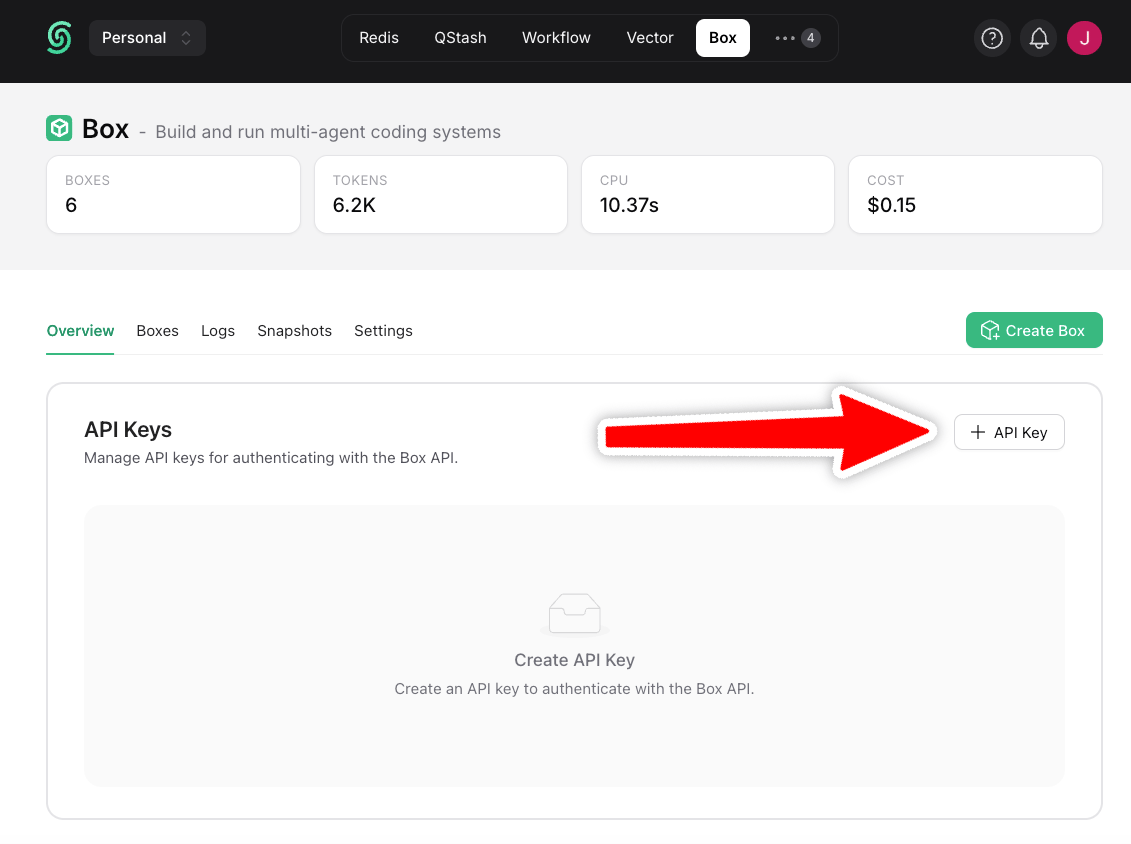
2. Install the SDK
3. Set API Key
.env
4. Create a Box
Init command
PassinitCommand to run a startup script each time the box starts. It runs once per container start, on create, on resume, and after a snapshot restore, so it is the place to start a server that should come back with the box.
/workspace/home, so it assumes a project is already there. You can read, change, or remove it later with getInitCommand, setInitCommand, and deleteInitCommand (get_init_command, set_init_command, delete_init_command in Python), on any box including a paused one. A box restored from a snapshot does not inherit the snapshot’s init command, so pass it again on the restore.
5. Configure an Agent (optional)
To configure an agent for your box, pass the model you want to use and the provider API key:- Claude
- Codex
6. Run Your First Task
Your box is ready to use! It’s a secure cloud environment to run agents, execute commands, or manage files. For example:7. Connect over SSH
You can also connect directly to a box shell with SSH:Use Cases
The idea behind Upstash Box is simple: give AI its own computer. Your agent gets a full, isolated cloud environment it can control. Run commands, write files, or execute code independent of any user device. Freeze a box anytime, and continue days or even weeks later with perfect resumability. Great example use cases:Agent Servers
One box per user with durable state. Personalized agents that remember context and improve over time.
Multi-Agent Orchestration
Fan out to multiple boxes running specialized agents in parallel, then combine their results.
Parallel Testing
Run the same inputs across isolated boxes and compare model output side by side.
Next Steps
How Boxes work
Learn the basics about using Upstash Box.
Agent
Boxes have Claude Code, Codex or OpenCode built-in.